Vocaber vs LingQ: Fluid Vocabulary Review or Reading Immersion?
Sometimes you want to get lost in a French story. Sometimes you just want to open an app and get straight to useful practice.
LingQ is built around reading and listening to content you choose. Vocaber is built around swift vocabulary review: fresh sentences, several words at a time, and a flashcard flow that adapts to what you remember.
Both put vocabulary in context. The difference is whether your session starts with a piece of content to explore or the words you need to practice now.
Vocaber vs LingQ at a Glance
| LingQ | Vocaber | |
|---|---|---|
| Starting point | A library lesson or content you import | Vocabulary that needs practice |
| Main activity | Read and listen, looking up and saving unfamiliar words | Move through short sentence-based flashcards |
| Context | Words reappear across the content you study | Fresh review sentences combine several vocabulary words |
| Review system | Saved vocabulary with SRS and optional review activities | Independent spaced repetition for each word |
| Review interaction | Configurable flashcards, reverse cards, cloze, dictation, and multiple choice | Read, check the translation, mark unfamiliar words, and continue |
| Your main choice | What you want to read or listen to | Which words in the sentence you did not know |
| Best fit | Learners who want to study through their chosen content | French learners who want focused, low-friction vocabulary review |
LingQ’s mobile guide explains its reader and imports. Its vocabulary review overview describes the optional exercise formats, while its SRS documentation explains due vocabulary.
What LingQ Does Well
LingQ lets you choose material from its library or import content you want to study. In the reader, you can look up unfamiliar words, save meanings, and encounter those words again in other lessons. Audio supports listening alongside the text.
That makes it appealing when your motivation comes from a particular story, topic, or speaker. The content gives you a reason to keep reading beyond the vocabulary itself.
You can also review saved vocabulary separately. LingQ offers several exercise types and lets you configure which ones to use. Those exercises are optional: you can keep learning through reading and listening instead.
Vocaber’s Priority: Keep the Review Moving
Vocaber is for the moment when you want less preparation and more practice. You do not need to choose a text or import a lesson before starting a review.
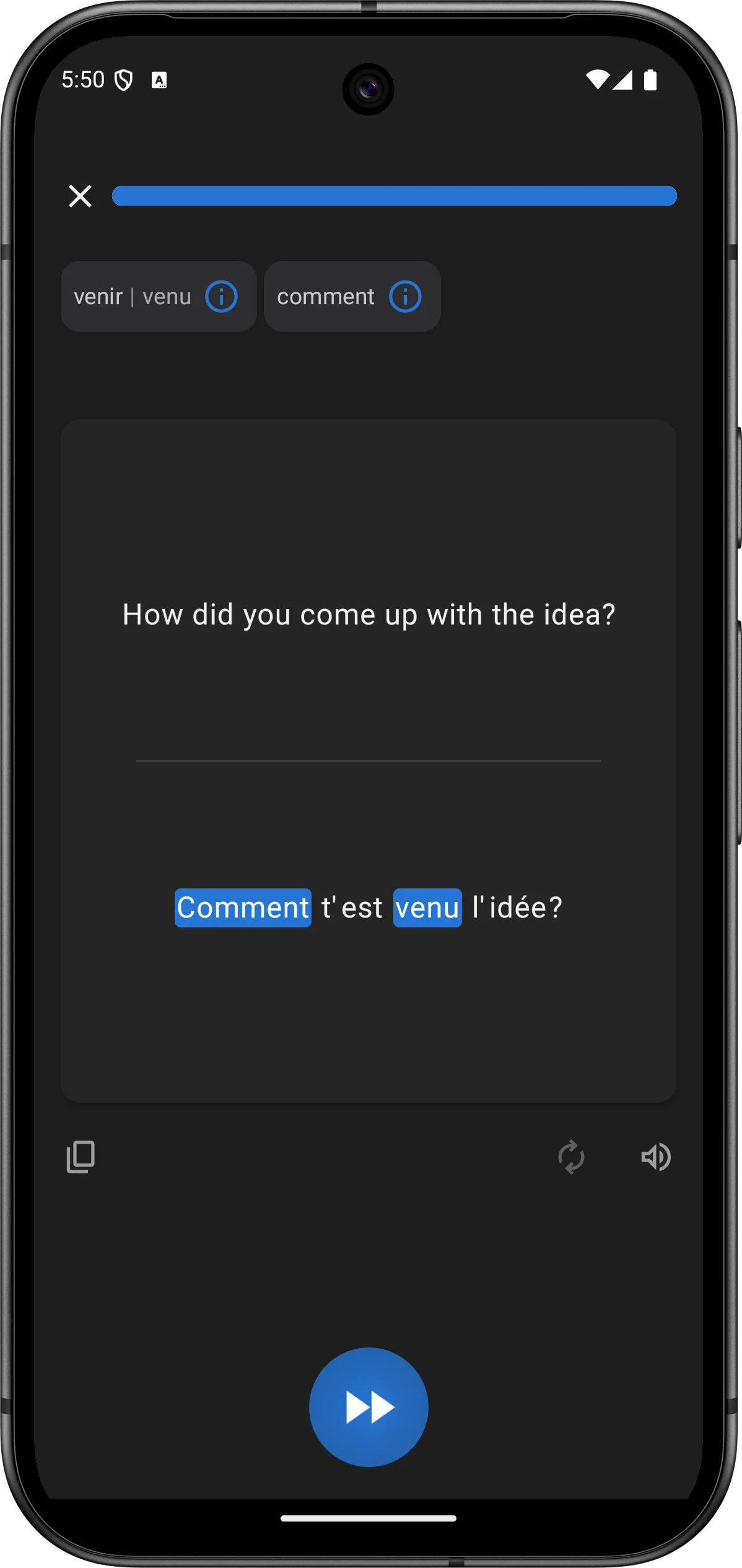
The flashcard loop stays simple:
- Read a French sentence and try to understand it.
- Reveal the translation.
- Tap the words you did not know.
- Move on to the next sentence.
Understand. Reveal. Mark. Continue.
You can spend a moment on an easy sentence and slow down when something needs attention. The flow does not depend on turning every encounter into a typed answer or a multiple-choice test.
The point of swiftness is not rushing past difficult words. It is keeping the interaction out of the way so you can spend your attention on the French.
Flashcards That Adapt Instead of Staying Fixed
Vocaber’s cards are not a fixed stack of sentences. The vocabulary has a review history; the sentence is assembled to provide context for the words that need practice.
For example:
Nous avons marché jusqu’à la maison avec notre voisin.
We walked to the house with our neighbor.
Perhaps maison is effortless, while voisin still takes work. You mark the words individually, so they do not inherit one shared result just because they appeared in the same sentence.
As your responses update each word’s schedule, the mix of due vocabulary changes. Later reviews bring words together in fresh sentences. The practice follows your changing needs rather than asking you to work through an unchanging test.
When Tests Get in the Way
Typing an answer, choosing between distractors, or completing a blank can be useful when that is the skill you want to practice. But a sequence of test screens can also feel cumbersome when your goal is simply to work through vocabulary in context.
You may understand a sentence immediately yet still have to complete an exercise to move forward. Or you may get the required answer right while remaining unsure about another word in the sentence.
Vocaber keeps the feedback closer to that actual uncertainty: identify the words you missed and keep going. It favors a fluid flashcard rhythm over making every review a formal test.
Reading Sessions vs Quick Review Sessions
Choose LingQ when you want to spend time with a text or recording you have selected. Following a story and meeting words in its wider context is a different experience from working through short reviews.
Choose Vocaber when you want to open the app and start practicing without deciding what to study first. Its narrow focus suits a short review break as well as a longer session: the same read-and-reveal flow continues while the vocabulary changes.
See the Vocaber walkthrough for more about input and output practice.
Can You Use Both?
Yes. Use LingQ for reading and listening, and Vocaber for focused French vocabulary review. They can serve different purposes without one replacing the other.
There is no need to turn every reading session into a review queue. Enjoy the content, then give vocabulary practice its own space. You can also pair Vocaber with a French podcast for intermediate learners or material from our native French podcast directory.
The Verdict
LingQ helps you explore content. Vocaber keeps vocabulary review moving.
If choosing your own reading and listening material is the main attraction, LingQ is a natural fit. If you want swift, fluid flashcards that bring due words together in fresh sentences, try Vocaber.
Vocaber is available on Android. Check Google Play for current subscription terms and availability.

For other approaches, compare French learning apps, Vocaber vs Anki, and Vocaber vs Duolingo.